Mass Efect 3 Hotest news

Mass Efect Has been realese new sequel series

Mau komputer murah tapi berkualitas

langsung aja datang atau pesen sesuai keinginan anda

Kreatos After His Brother

Tampilkan postingan dengan label Utilities. Tampilkan semua postingan

Senin, 04 Juni 2012

Stardock ObjectDock Plus v2.01.743 [FULL] [Jumbofiles]


Mungkin kamu tahu software desktop Rocket Dock .Sekarang saya akan share software sejenis yaitu Object Dock Plus 2.0.5 Aturlah shortcut yang ada di PC kamu di Object Dock Plus sehingga kamu akan mudah untuk menjalankan aplikasi,games maupun folder favorit.Dengan animasi yang halus,Object Dock Plus akan menghiasi desktop PC kamu.

Stardock ObjectDock Plus merupakan salah satu aplikasi untuk mempercantik tampilan desktop sobat blogger. Cara Instal :
1. Disable dulu AV (beberapa AV menganggap Key virus, namun sebenarnya aman)
2. Instal Program
3. Jalankan Keygennya
4. Klik tombol patch5. Lalu pilih file CrashRpt.dll maka jika ada tulisan succesfull maka patch berhasil
6. lalu klik tombol Save License
7. klik tombol save


special thanks : Lutfi29.net

Minggu, 05 Februari 2012

Partition Assistant Professional 4.0 Retail


Partition Assistant Professional 4.0 Retail
DOWNLOAD Partition Assistant Professional 4.0 Retail

Partition Assistant Professional 4.0 Retail - Aomei Partition Assistant Professional Edition allows you to manage your disk partition similar with Partition Magic. It can perform more complicated partition operations on your disk like Resize and Move Partition, Extend System Drive, Repartition, Merge, Split Partition etc, and it can work well on Windows 2000, XP, Vista and Windows 7 (both 32bit and 64bit).

This professional edition is an advanced Windows partition manager software to assist you to optimize disk performance, and most widely being used by personal users which allows you to be an partition solution expert with professional unique technology. It adopts the low-level commands like sector-grade to ensure all operations higher efficiency.

Main Features

Extend NTFS partition without restarting computer.
Resize and Move partition to optimize disk space management.
Extend Partition Wizard help you step by step expand the size of your selected partition.
Merge partitions into a larger one. New!
Split partition into two or more with ease.

New!

Allocate free space from one partition to another for effective use of storages. New!
Create partition as you wish even without unallocated space. New!
Merging non-continuous unallocated space to partition is available. New!
Convert primary partition to logcial partition and vice versa. New!
Clone/Copy Disk, Clone/Copy Partition
Support USB flash hard drive.New!
Suport GPT disk up to 4TB. New!
Support Windows 2000/XP/Vista/Windows 7 (Both 32 bit and 64 bit).

Notepad++ 5.9.7 Final Portable ML


Notepad++ 5.9.7 Final Portable ML
DOWNLOAD Notepad++ 5.9.7 Final Portable ML

Notepad++ Portable has all the same great features of Notepad++ including support for multiple languages and an extensive plugin system, but there’s nothing to install.

Here are some key features of “Notepad plusplus Portable”:

Syntax Highlighting and Syntax Folding (C, C++, HTML, ASP, Java, Pascal, CSS and more)
User Defined Syntax Highlighting
Auto-completion
Multi-Document
Regular Expression Search/Replace supported
Full Drag N’ Drop supported
Zoom in and zoom out
Multi-Language environment supported
Brace and Indent guideline Highlighting
Macro recording and playback

Extract on hard disk or USB key and run Notepad++Portable.
If you use as default editor (F4 in Total Commander) edit Notepad++Portable.ini with AllowMultipleInstances=true.
Language fixed by launcher according Windows localisation : Arabic, Bulgarian, Catalan, Croatian, Czech, Danish, Dutch, Farsi, Finnish, French, German, Greek, Hebrew, Hungarian, Indonesian, Italian, Japanese, Korean, Lithuanian, Norwegian, Polish, Portuguese, PortugueseBR, Romanian, Russian, SimpChinese, Slovak, Slovenian, Spanish, Swedish, TradChinese, Turkish, Ukrainian.
Settings saved in Data folder.
Settings of installed Notepad++ should be preserved.

OS : Win XP/2000/Vista/Win 7
Language : Multilanguage

PGWARE PcBoost 4.1.2.2012


PGWARE PcBoost 4.1.2.2012
DOWNLOAD PGWARE PcBoost 4.1.2.2012

PcBoost is a program which allows you to run programs much faster then the original programmer intended. With little to no effort you can easily make programs & games run faster on your computer without having to purchase a new PC. Many programs and games often use a minimal amount of CPU power which often leads to the CPU being idle and really not much use at all.

PcBoost takes advantage of this by allocating more CPU power to the currently active program/game. All of this is done automatically without having you to lift one finger. PcBoost is a great affordable alternative to purchasing a new computer and can in no way harm or destroy a computer, while providing equivalent power that a faster processor would.
Main features:
• Optimizes games and applications by increasing the CPU priority thread of the currently active application
• Automatically de-allocates CPU priority when a new active application is selected
• Works in the background to optimize applications constantly, raises priority levels to reasonable values to maintain system stability and performance
• Visual representation in the Windows system tray which displays the priority optimization for the currently active application
• Built-in and constantly updated block list of applications which are not compatible
• Fully customizable interface which allows end-user to change the look of the software and the Windows system tray icon theme
OS : Win XP/2000/Vista/Win 7
Language : English

Remote Desktop Manager Enterprise 6.9.0.0

Remote Desktop Manager Enterprise 6.9.0.0
DOWNLOAD Remote Desktop Manager Enterprise 6.9.0.0

Remote Desktop Manager is a small application used to manage all your remote connections and virtual machines. Add, edit, delete, shared, organize and find your remote connection quickly. Compatible with Microsoft Remote Desktop, Terminal Services, VNC, LogMeIn, Team Viewer, Ftp, SSH, Telnet, Dameware, X Window, VMware, Virtual PC, PC Anywhere, Hyper-V, Citrix, Radmin, Microsoft Remote Assistance, Sun Virtual Box and more.

FEATURES:
Microsoft Remote Desktop (RDP)
Microsoft Remote Assistance
VNC (UltraVNC, TightVNC, RealVNC and embedded)
LogMeIn
Team Viewer
FTP (Explorer, Filezilla and WinSCP)
X Window
Putty (SSH, Telnet, RAW and rLogin)
Dameware Mini Remote Control
Radmin Viewer
Citrix XenApp (ICA)
Symantec PC Anywhere
Microsoft Hyper-V
Microsoft Virtual PC
Microsoft Virtual Server
Microsoft Windows Virtual PC
Sun VirtualBox
VMware Player, VMware Workstation, VMware ESXi and VMware vSphere
Cisco VPN client
SonicWall Global VPN client
DOWNLOAD:

TheAeroClock 2.33 ML


TheAeroClock 2.33 ML
DOWNLOAD TheAeroClock 2.33 ML

TheAeroClock is a unique desktop clock with transparency. This very decorative desktop clock shows the local time at the Desktop. The basic functions: total transparency, size, setting, and the selection of the Clock-texture or the appearance are available.


DOWNLOAD:
FiLeSoNiC

MeDiAFiRe

Video2Webcam 3.2.9.2


Video2Webcam 3.2.9.2
DOWNLOAD Video2Webcam 3.2.9.2

Video2webcam enables you to show video clips as virtual webcam during video chat whether you own a real webcam or not. You could either share your home-made video clips easily with your friends while chatting on line or make fun of them by pretending to be somebody else. With it, you can play a variety of videos on messengers and switch between real & virtual webcams easily & quickly.It supports all kinds of media file formats including video formats (avi, asf, flv, mp4,mpeg, mpg, ram, rm, rmvb, wmv and etc.) and picture formats (jpg, gif, bmp, png and etc.). Besides, it works on all webcam programs such as MSN, Camfrog, Skype, ICQ, AIM, Paltalk, Yahoo Messenger, ANYwebcam, Stickam, ICUII, Ustream.tv, iSpQ, etc.

Key Features:
Show video clips during video chat:
· You could either share your home made videos with your family or make fun of your friends by pretending to be somebody else.

Work even without a real webcam:
· Play a variety of videos on messengers no matter whether you have a real webcam or not.

Support all kinds of media file formats:
· Include video formats (avi, asf, flv, mp4,mpeg, mpg, ram, rm, rmvb, wmv and etc.) and picture formats (jpg, gif, bmp, png and etc.).

Work for all webcam programs:
· MSN, Camfrog, Skype, ICQ, AIM, Paltalk, Yahoo Messenger, ANYwebcam, Stickam, ICUII, Ustream.tv, iSpQ

EssentialPIM Pro 4.53 Portable


EssentialPIM Pro 4.53 Portable
DOWNLOAD EssentialPIM Pro 4.53 Portable

EssentialPIM Pro is the advanced version of Personal Information Manager. Handles all your scheduling, contacts, to do lists and notes with easy-to-use, intuitive tools. Pro version significantly distinguishes from EssentialPIM Free, taking functionality on a completely another level. When you run EssentialPIM Pro for the first time, the program creates test.epim database, which contains test tasks and contacts. EssentialPIM Pro can store links to any files or files themselves in its database. Each element, be it Task, Note, To Do or a Contact can store files, relevant to this element. EssentialPIM Pro allows you to print out all your information in easy to read form. All data can be printed one-by one, or you can select multiple entries using CTRL + mouse (for contacts and Notes), or All entries can be printed. To rotate the page, in the Print Preview Page, find "Page Setup", or press Alt+U and you will be able to change the Orientation of the page.

Features:
- Multi-users access to database
- Storing and/or linking attachments
- Assigned people for To Do
- Advanced Backup
- Editable categories of tasks or events
- Hierarchical To Do lists
- Contact Groups
- Color Printing
- Sending any item to email
- Synchronization with Windows Mobile or Palm devices
- Outlook synchronization
- Google synchronization
- Custom views
- Mass mail
OS : Win XP/2000/Vista/Win 7
Language : Multilingual

Team Viewer 6.0.9947 Full


Team Viewer 2011 Movie Poster

Name: Team Viewer 6.0.9947


Size :4 MB


Description : TeamViewer is a simple and fast solution for remote control, desktop sharing and file transfer that works behind any firewall and NAT proxy. To connect to another computer just run TeamViewer on both machines without the need of an installation procedure. With the first start automatic partner IDs are generated on both computers. Enter your partner’s ID into TeamViewer and the connection is established immediately. With many thousand users worldwide TeamViewer is a standard tool to give support and assistance to people in remote locations.The software can also be used for presentations, where you can show your own desktop to a partner. TeamViewer also is VNC compatible and offers secure, encrypted data transfer with maximum security. TeamViewer is completely free for private use


Mediafire Download Link


Mediafire Password = MediafireRocks.Com

Sabtu, 04 Februari 2012

Super Hide IP 3.1.8.6


Super Hide IP 3.1.8.6
DOWNLOAD Super Hide IP 3.1.8.6

Do you know what your IP address means? Are you aware that your IP address is exposed every time you visit a website? Many websites and hackers use IP address to monitor your home address and other personal information. Your IP address is your online identity and could be used by hackers to break into your computer, steal personal information, or commit other crimes against you. Super Hide IP allows you to surf anonymously, keep your IP address hidden, protect your personal information against hackers and provide full encryption of your online activity, all with a simple click of a button.

Key Features
* Anonymous Web Surfing Click Hide IP button and you will be assigned fake IP addresses, preventing others from getting your true IP when surfing the Internet.
* Protect Your Identity Surf anonymously to prevent hackers or identity thieves from monitoring your web activity or intercepting your personal information such as your financial information.
* Choose IP Country You can select to use fake IP from different countries via "Choose IP Country" option and can Check IP directly.
* Send Anonymous E-mails Hide your IP in E-mail headers. Be protected while sending e-mails via Yahoo!, Hotmail, GMail.
* Un-ban Yourself from Forums and Restricted Websites Use Super Hide IP to change your IP which allows you to access any forums or websites that has ever banned you.
* Platform Windows 2000/XP/Vista/7 (32-bit and 64-bit)

DOWNLOAD:
FiLeSoNiC

MeDiAFiRe

Omega Unfold Webcam Zone Trigger Pro 2.505


Omega Unfold Webcam Zone Trigger Pro 2.505
DOWNLOAD Omega Unfold Webcam Zone Trigger Pro 2.505

Omega Zone Trigger is an innovative, intelligent motion detection software that gives you full control over the area being monitored. Because of its user-friendly, object-oriented interface, Zone Trigger is hands-down the easiest motion detection software to use.

Webcam Zone Trigger is a security tool that allows you protect your home.

Zone Trigger is a security-oriented motion detection software that sets itself appart from other motion detection systems because it uses Hot Spots to detect movement in specific zones of the image instead of looking for any movement, anywhere.

It was designed with the following purposes in mind: Security, monitoring and house automation. Upon detecting motion, Zone Trigger can perform many things, such as taking pictures, capturing video, sending images on the internet, executing processes, and more.

Here are some key features of "Webcam Zone Trigger":
· Play sound (.wav files).
· Capture an image (.bmp files).
· Capture video (.avi files).
· Send pictures to an FTP server on the Internet.
· E-mail pictures to any address.
· Run a file (anything: .exe, .jpg, MP3...).
· Count sequentially.
· Trigger a mouse left click.
· Send a HotKey.
· Mute the Windows master volume.
· Display a "Toast" Pop-Up alert.
· Webcam Zone Trigger can also...
· Keep a detailed log file - see General settings.
· Take pictures automatically at a given interval (for example every 10 minutes) - see General settings.
· Start automatically when your computer is turned on - see General settings.
· Broadcast live video over the internet to any web browser- see Internet settings .
· Run in the background, without disturbing you and your other applications - see Choose an operating mode.

DOWNLOAD:
MeDiAFiRe

Registry Winner 6.5.1.17 ML


Registry Winner 6.5.1.17 ML
DOWNLOAD ORPALIS PaperScan 1.4.0.4 Professional Edition Bilingual

PaperScan is a powerful TWAIN & WIA scanning software with an OCR engine centered on one idea : making document acquisition an unparalleled easy task for anyone. PaperScan is simply universal while most of the scanning applications are dedicated to one scanner or one protocol. With PaperScan you can control any scanner (TWAIN or WIA) including network scanners, cameras or acquisition cards via one simple click : all capabilities are automatically handled and negotiated by PaperScan. Import any image/PDF files in PaperScan, arrange them in any imaginable single-page/multi-page configuration, perform a wide range of image adjustments/enhacements, annotate your documents with sticky notes, rubber stamps, highlighter or arrows and save your work in various file formats including JPEG, TIFF, PDF and JBIG2.


DOWNLOAD:
FiLeSoNiC

MeDiAFiRe

SpeedCommander 14.10.6700 Portable


SpeedCommander 14.10.6700 Portable
DOWNLOAD SpeedCommander 14.10.6700 Portable

SpeedCommander is a comfortable file manager. It builds on the proven two window technology and offers a multitude of exclusive features. Sort, copy, move or delete your files either using the keyboard or the mouse. SpeedCommander reads and creates ZIP archives, Microsoft CAB files and fully supports ten additional compression formats. The newly expanded search feature will find files within all ten supported Archive formats. The internal file viewer displays over 80 graphics and text formats. In addition, SpeedCommander contains a powerful text editor with numerous extras including syntax highlighting. With the integrated FTP client, you can both download files from the net and upload your own web pages. SpeedCommander even integrates a web browser for you to surf the web!

* Two folder windows which can be arranged horizontally or vertically
* Multiple folder views in one folder panel
* File Container with multiple independent containers
* Quick access to Network Neighborhood, Internet and FTP
* Direct support for the many archive formats (including 7Z, RAR, SQX, ZIP)
* Integrated Quick View for many file formats
* Multi-rename tool
* Fast and comfortable Search Program (FileSearch)
* Synchronize files and folders (FileSync)
* Flexible editor for text files (SpeedEdit)

SpeedCommander is a comfortable file manager. It builds on the proven two window technology and offers a multitude of exclusive features. Sort, copy, move or delete your files either using the keyboard or the mouse. Proven Two Window Technology

SpeedCommander displays files and folders in the proven two window technology - source and target of operations are therefore always visible. This ensures a higher productivity compared to Windows Explorer and an extremely fast navigation through files, folders and FTP sites.

SpeedCommander offers you many options for copying and moving files. Besides the usual deletion SpeedCommander has a secure deletion compliant to governmental standards. With the integrated Quick View SpeedCommander shows you the content of many file formats. Pictures, videos or music files - SpeedCommander gives you a fast overview for every kind of files. FileSync synchronizes folders, FileSearch finds files and folders on all data mediums. Extensive Archive Support

SpeedCommander makes handling compressed files easy, because they are treated like ordinary folders. Experience direct support for many archive formats as well as compressing and decompressing them without the need for further software. Compression profiles can sum up settings and self-extracting archives make additional software superfluous. Recovery data offers protection against damaged archives.

Add-In Interface
SpeedCommander has a modern Add-In interface, so that additional plugins can be used, enhancing the original functionality. SpeedCommander communicates with the Add-In via the component object model (COM). An Add-In can add functionality in the menu or the toolbars. The Add-Ins also have full access to SpeedCommander's object model. They can open and alter folder windows, as well access their content.

Add further file systems via the interface for file system Add-Ins into SpeedCommander. Use the WinCeFS Add-In to access PDA devices with ActiveSync. The WfxWrapper Add-In integrates the many file system plugins from Total Commander (wfx).

Macros
Simple tasks can be automated with macros. Macros can use the different objects of SpeedCommander too, also all script capable components (e.g. several shell objects) can be included. Edit macros easily with the integrated macro editor and check them for possible errors with a script debugger (like Visual Studio).

Enhanced FTP Functions
SpeedCommander supports various FTP types like FTP via SSH (SFTP) and SSL encrypted FTP. The user just needs to choose a protocol, everything else is done by Speedcommander in a transparent way. The support for proxies was expanded noticeably. SpeedCommander supports Socks 4/4a/5 and HTTP connections. The user can choose to compress directory listing and file transfers with MODE Z. Band width limiting keeps your line responsive, if required. Native 64-bit Version for Windows x64 Edition

SpeedCommander is also available as native 64-bit version for Windows x64. Only a real 64-bit file manager can access all files on Windows x64. 32-bit applications are rerouted to "Windows\SysWow64" and can't access the folder "Windows\System32".

DOWNLOAD:
FiLeSoNiC

MeDiAFiRe

WinHex 16.3 SR-2 Portable

WinHex 16.3 SR-2 Portable
WinHex 16.3 SR-2 Portable | 1.75MB
WinHex is a universal hexadecimal editor, particularly serves to assist in the field of computer forensics, data recovery, low level data processing, and IT security. A sophisticated tool that is used for day-to-day and in emergencies: inspect and edit all kinds of files, recover deleted files or lost data from hard drives with corrupt file systems or from digital camera cards.
Features:
  • Disk editor for hard disks, floppy disks, CD-ROM & DVD, ZIP, Smart Media, Compact Flash, ...
  • Native support for FAT12/16/32, exFAT, NTFS, Ext2/3/4, Next3®, CDFS, UDF
  • Built-in interpretation of RAID systems and dynamic disks
  • Various data recovery techniques
  • RAM editor, providing access to physical RAM and other processes' virtual memory
  • Data interpreter, knowing 20 data types
  • Editing data structures using templates (e.g. to repair partition table/boot sector)
  • Analyzing and comparing files
  • Particularly flexible search and replace functions
  • Disk cloning (under DOS with X-Ways Replica)
  • Programming interface (API) and scripting
  • Drive images & backups (optionally compressed or split into 650 MB archives)
  • Concatenating and splitting files, unifying and dividing odd and even bytes/words
  • 256-bit AES encryption, checksums, CRC32, hashes (MD5, SHA-1, ...)
  • Import all clipboard formats, incl. ASCII hex values
  • Character sets: ANSI ASCII, IBM ASCII, EBCDIC, (Unicode)
  • more ...


Password Link
freesoft88

USB Disk Security v.6.0.0.126 Full Mediafire

USB Disk Security v.6.0.0.126 Full Mediafire | 4.5 Mb
USB Disk Security v.6.0.0.126 a tool that can provide 100% protection against the USB Drive. These tools are very lightweight and easy to use. USB Disk Security uses innovative proactive technology to block any threats via USB drive. USB Disk Security is the best software to provide protection to the USB drive.
4-Bang Full Premium Software

Download Link:
MEDIAFIRE

Download

EZ-Drummer Version 1.0 Mediafire

EZ-Drummer Version 1.0 Mediafire | 1 GB
EZdrummer® is a multi-microphone drum sampler designed for musicians and producers in need of a compact, affordable, easy to handle plug-in without compromising sound quality or control. The visualized drums in the interface combine auditioning of sounds and drumkit construction. The extensive drag and drop MIDI library (featuring 8000+ MIDI files) enables users to create a great drum track in just a few clicks. For more advanced handling, users can control microphone bleeding and levels between drums using the internal mixer.
The mixer also allows stereo and multitrack routing into the host through one single plug-in, and thanks to the second generation Toontrack® Percussive Compression (TPC), system requirements are kept to a minimum. FreeDown4u - Download Full Premium Software Mediafire.

The drums for EZ-Drummer® were recorded, produced and played with the best in the business. From our pro Superior Drummer® line we’ve adopted the humanizing features that are instrumental in making our drum samplers the pinnacle in digital drum production. You can join using this with FL Studio and Nuendo.

Screenshot:
Click image to enlarge!
 
EZdrummer® Facts & Features:
  • 7000 sound files at 16-bit / 44.1kHz equivalent to 5Gb of uncompressed wav files.
  • Instant access to more than 8000 midi drum patterns with prelistening, quick browsing and drag’n’drop functionality.
  • Same extensive layer depth on all drums and cymbals as in EZdrummers big brother Superior Drummer®.
  • EZdrummer® ranges from entry level usability to pro handling
  • Features multiple microphone control
  • TPC II reduces system requirements to a minimum
  • Operates in General MIDI
  • Internal mixer allows stereo and multitrack routing into the host through one single plug in
  • Preset mix modes for quick sound changes
  • Interface visualizes the drums loaded and combines auditioning and kit construction
  • Drums recorded at Avatar Studios, New York by worldclass drummers and producers
  • The humanizer function combines drum hit randomizing and non-cycling
  • Velocity sweep allows instant changes to MIDI data, extending groove context relevance
  • Possibilities for the user to add their own MIDI files to the library

System Requiments:
Windows XP, PIII / Athlon 1.8GHz with 512Mb RAM
Mac OSX 10.2.8 or higher, G4 1GHz with 512Mb RAM


Download Links:
MEDIAFIRE
http://www.mediafire.com/?8tkhqxrkk0jkdpe part 1
http://www.mediafire.com/?jw7s2rd4qgp9tqm part 2
http://www.mediafire.com/?7j9672rjvnarw0c part 3
http://www.mediafire.com/?rqg4cobo9h7o7gw part 4
http://www.mediafire.com/?xjp5s7a8w3q2jrz part 5
http://www.mediafire.com/?ad3a4tkut3hwal9 part 6
http://www.mediafire.com/?mvv046hzaq5vhs3 part 7
http://www.mediafire.com/?wox457keqjjs58e part 8
http://www.mediafire.com/?41qtj2125y0dh2k part 9
http://www.mediafire.com/?jss5zl2phtmi6sr part 10
http://www.mediafire.com/?77e1joa55r5e7p1 part 11
http://www.mediafire.com/?qmxb0yt2cwstyqe part 12
http://www.mediafire.com/?ole6rp3pah7hc33 part 13
http://www.mediafire.com/?32mmug1c69p15jz part 14
http://www.mediafire.com/?7olcr0p76lo7i7g part 15
http://www.mediafire.com/?h3a7c9vljsf9n92 part 16
http://www.mediafire.com/?7p68h3m7dhba57r part 17
http://www.mediafire.com/?l4y2d9zlpzz683n part 18
http://www.mediafire.com/?yw42439wn0y9sd4 part 19
http://www.mediafire.com/?erfcmf7akmawj7v part 20
http://www.mediafire.com/?genl6nirffy0pxb part 21

Selasa, 31 Januari 2012

BlackBerry Simulator

BlackBerry Simulator | Miliki BlackBerry di komputermu


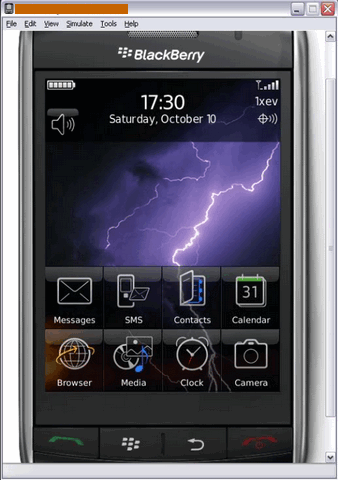
BlackBerry Simulator | Miliki BlackBerry di komputermu - Bagi anda yang ingin merasakan bagaimana menggunakan blackberry tanpa harus merogoh isi dompet dalam-dalam, mungkin Blackberry Simulator adalah solusi yang tepat untuk anda gunakan. Blackberry simulator ini adalah emulator yang resmi di keluarkan oleh pihak RIM dengan nama Blackberry Device Simulators. Semua yang di miliki smartphone blackberry dapat anda nikmati dengan blackberry simulator, kecuali BBM hehe.


Tutorial + Installasi

Bahan

Tutorial

1. Pertama, di pc anda harus sudah terinstall JDK (bahan4), Jika belum silahkan di download dulu lalu installah. Selanjutnya Download "BlackBerry Client Simulator" (bahan1) dan silahkan langsung di install ( Client ini hanya untuk BlackBerry® Device Simulators v7.1.0.98 9900 )

2. Setelah menginstall blackberry client simulator, sekarang saatnya mendownload BlackBerry Smartphone Simulatornya (bahan2). pada "Please A Select Product" klik lalu pilih "BlackBerry Device Simulators v7.1.0" Dan klik next.


3. Pada pilihan  "Software For BlackBerry Device Simulators v7.1.0" Lalu pilih BlackBerry® Device Simulators v7.1.0.98 (9900) dan klik download. Pada halaman berikutnya klik download dan Download The Installer

4. Jika selesai di download, sekarang saatnya mendownload "Email and MDS" caranya klik link Pada bahan no3 di atas, lalu pada "Please Select A Product" pilih "Developer Software - Eclipse JDE" klik next lalu di "Software For Developer Software - Eclipse JD" pilih OS yang anda gunakan, di sana terdapat 4 pluigin:
- BlackBerry Java Plugin for Eclipse v1.5.0.2011 (Windows)
- BlackBerry Java Plugin for Eclipse v1.5.0.2011 (Mac)
- BlackBerry Java Plugin for Eclipse v1.5.0 (Windows)
- BlackBerry Java Plugin for Eclipse v1.5.0 (Mac)
Pilihlah versi yang terbaru, lihat yang saya bold di atas.


5. Selanjutnya klik download dan ikuti step by step seperti saat anda mendownload BlackBerry Device Simulators. Nah kini semua bahan sudah anda miliki.


Installasi
1. Install bahan no4 ( jika anda mengikuti step by step yang ada, step no 1 ini di lewati saja )
2. Install bahan no1 ( jika anda mengikuti step by step yang ada, step no 2 ini di lewati saja )
3. Install bahan no2 ( lakukan installasi seperti install software biasanya )
4. Install bahan no3 ( lakukan installasi seperti install software biasanya )

Sekarang anda sudah memiliki BlackBerry simulatornya, kini pengoprasiannya
1. Jalankan program MDS simulator, buat koneksi internetnya.. di
start>all programs>Research In Motion>BlackBerry Email and MDS Services Simulators 4.1.2>MDS.exe (ntar muncul command prompt teks2 ga jelas banyak banget) (stlah selesai diminimize ya, JANGAN diclose)

2. setelah jalanin program MDS, selanjutnya jalanin program BlackBerry Smartphone Simulator di
start>all programs>Research In Motion>BlackBerry Smartphone Simulators 4.7.0>4.7.0.76>9530.exe
akan muncul command prompt(tunggu bentar), (klik ok aja kalo muncul dialog) lalu mucul tampilan seperti ini
 Selesai

Kini anda telah memiliki sebuah blackberry di pc anda, semua yang dapat di lakukan oleh smartphone blackberry dapat juga anda nikmati dengan blackberry simulator ini.
Untuk image terakhir saya mengambilnya dari google ( sudah coba saya upload tapi gak bisa di load ke artikel ini ), jika anda ingin mengetahui bagaimana bentuk blackberry 9900, bisa langsung mencarinya di google heheh.

Note
Untuk yang mau mendownload, ketika mengklik link dan di hadapkan pada pilihan registrasi. silahkan registrasi terlebih dahulu.

Terimakasih telah berkunjung ke koskomputer
jangan lupan untuk di bookmark yah

Minggu, 29 Januari 2012

Plug in for adobe audition

Plug in 1
download

plugin 2
antares tune

Colection
download

Kamis, 12 Januari 2012

TuneUp.Utilities.2012.v12.0.Incl.Keymaker-CORE Full Version


  I think u know about this software,yeah this is tune up utilities software is the one software who can manage youre systme performance also u can improve the system to.


Link Download:

Minggu, 08 Januari 2012

Macromedia Fireworks 8 + Serial Number Full Version


Macromedia Fireworks 8 + Serial Number Full Version, Download Serial Number ( SN ) Macromedia Fireworks 8, Macromedia Fireworks 8 Full Version Download, Blog Software Full Version Free, Fungsi Software Macromedia Fireworks 8, Kegunaan Macromedia Fireworks 8


Macromedia Fireworks 8 Merupakan software editing Image, Tidak Berbeda jauh dengan adobe photoshop, Macromedia Fireworks 8 ini Juga Dapat Mengedit Image, Perbedaannya adalah software ini lebih condong fokus ke image ber extensi PNG yang biasanya khusus untuk website.


Link download:
- Macromedia Fireworks 8 - (88.36 MB)
- Serial Number - (3.86 KB)